Unpinned V2: PDF, CSV, bigger boards and a panel on the page
Unpinned 2.0.0 is out for Chrome, Firefox and Edge. PDF export on Pro, CSV for everyone, boards up to 100,000 pins, and the controls on the Pinterest page.
Product
Unpinned V2, version 2.0.0, is live in Chrome, Firefox and Edge. It adds PDF export on Pro and CSV export for everyone. A rebuilt download engine runs several boards at once and handles boards up to 100,000 pins. And Unpinned now sits on the Pinterest page itself instead of in the toolbar. The free plan, the file quality and sections as folders stay as they were. If you already have Unpinned, your browser updates it on its own.
What is new in 2.0.0
| Change | What you get | Plan |
|---|---|---|
| PDF download | The whole board as one PDF, to share, print or present | Pro |
| CSV download | The board's pins as a spreadsheet, one row per pin | Free and Pro |
| Rebuilt download engine | Several boards at the same time, larger boards, faster than before | Free and Pro |
| In-page panel | Unpinned in the corner of the Pinterest page, no popup | Free and Pro |
PDF on Pro
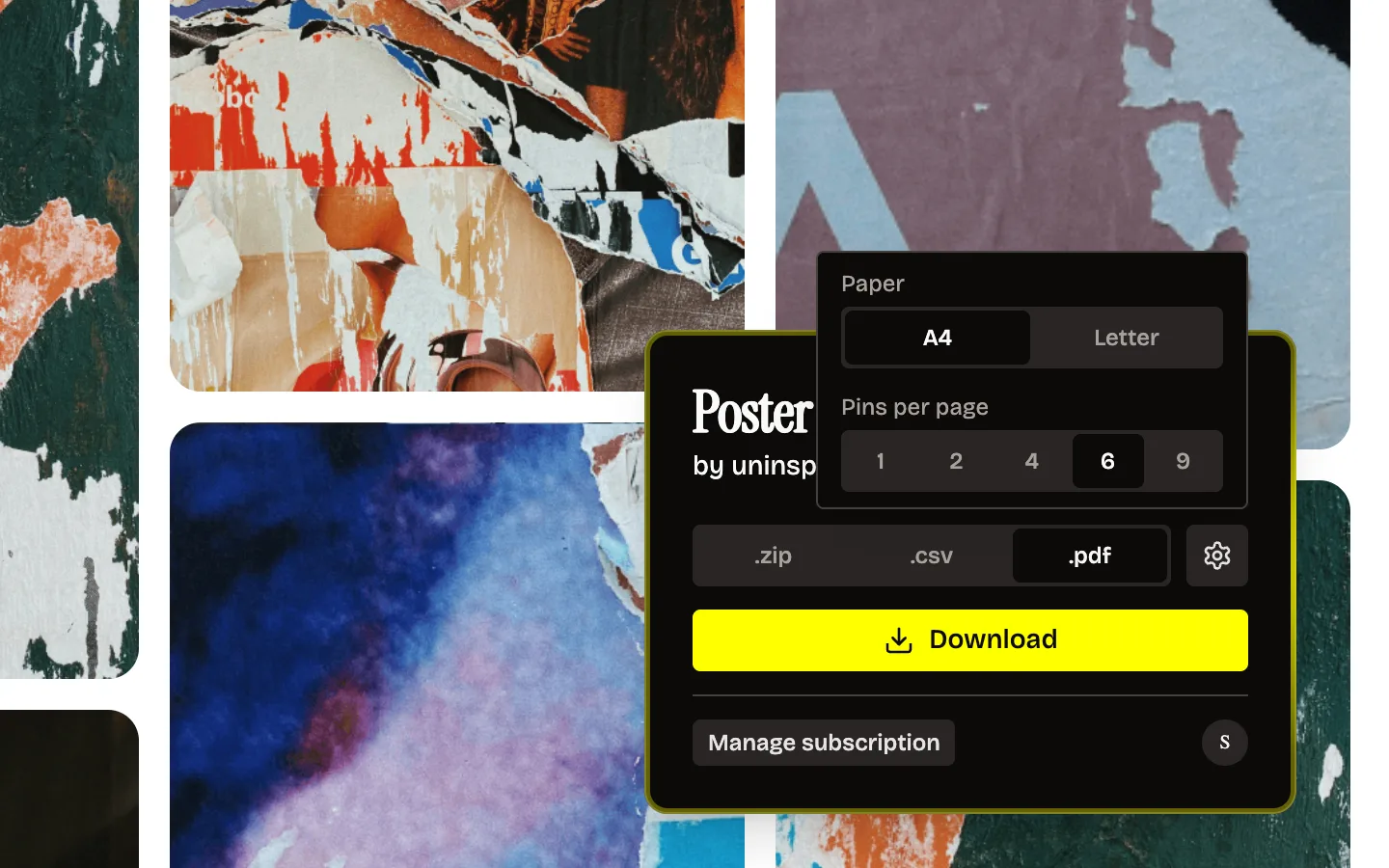
Pick .pdf in the panel and Unpinned turns the board into one PDF. A4 or Letter, 1, 2, 4, 6 or 9 pins per page, and each section on its own pages. Pinterest board to PDF has the full walkthrough.
CSV for everyone
Pick .csv and you get the board as a list instead of files. Each row is one pin with its title, link and section. Good for auditing a board, keeping track of sources, or handing a reference list to someone. It is not a backup, because links die when pins do. For that, take the ZIP.
A rebuilt download engine
We rewrote the part that does the actual downloading. Three things came out of that.
You can download several boards at the same time. Start one, open the next board in another tab, start that one too.
Larger boards come down. We tuned the engine until a board with up to 100,000 pins downloads. Download Pinterest boards with up to 100,000 pins covers how that works, including why a very large board arrives as several ZIP files.
And it is faster than before.
The panel lives on the page
Before V2, Unpinned hid in the browser toolbar popup, behind the puzzle piece. Now it sits in the bottom-right corner of the board and stays there as you scroll. Click it and the panel opens right there: board name, format, settings, Download. You never leave the page to reach the controls. The Unpinned corner icon goes through every part of it.
What stayed the same
- Free plan. 50 pins a day, no card.
- Full-quality files. The largest image or video Pinterest holds for each pin, not the grid thumbnail.
- Sections as folders. A board with sections still comes down with one folder per section inside the ZIP.
- Browsers. Chrome, Firefox and Edge, on desktop. Still no Safari.
- Pro. Unlimited downloads, now with PDF export on top. The Pinterest board downloader page has the details.
How to update
2.0.0 is live on the Chrome Web Store, Firefox Add-ons and Edge Add-ons. Most browsers have already installed it for you in the background. To check which version you are on:
| Browser | Where the version is |
|---|---|
| Chrome | Open chrome://extensions, find Unpinned, click Details |
| Edge | Open edge://extensions, find Unpinned, click Details |
| Firefox | Open about:addons, go to Extensions, click Unpinned |
If it still says 1.0.18 or lower, you can ask the browser to update now. In Chrome and Edge, switch on Developer mode on the extensions page and click Update. In Firefox, click the gear at the top of the add-ons page and choose Check for Updates.
Then reload any Pinterest tab that was already open. A page loaded before the update needs a reload to show the new panel.
New to Unpinned? Install it from the store and open any board.
FAQ
Is V2 a free update?
Yes. Everyone gets 2.0.0, on the free plan and on Pro.
Did the free plan change?
No. It is still 50 pins a day.
Is CSV export free?
Yes. .csv works on the free plan and on Pro.
Do I need Pro for PDF?
Yes. On the free plan the .pdf tab shows a lock.
Where did the toolbar popup go?
The controls moved onto the Pinterest page. Open a board and click Unpinned in the bottom-right corner.
Does V2 work in Safari?
No. Unpinned runs in Chrome, Firefox and Edge on desktop.